About NMRPipe
Typical NMRPipe Workflow for Spectral Processing
nmrDraw graphical interface. For this reason, in order
to use NMRPipe you will need a working knowledge of UNIX,
including use of a text editor and creation of shell scripts.
-
Prepare a script to convert spectrometer format data to NMRPipe format via an interactive interface.
Commands:
bruker/varian/delta. -
Execute the conversion script, and inspect the result via the
nmrDrawgraphical interface. Use the Proc/Auto Process 1D menu option to process the first 1D vector, and use the graphical interface to find a phase correction value. -
At the UNIX command-line, use a text editor to create or adjust a processing script
containing the needed phase corrections etc. Commonly, the processing script is copied
from a previous case. Processing scripts can also be created via new general-purpose
scripts:
basicFT2.com/basicFT3.com/basicFT4.com. -
Execute the processing script and read the processed result with
nmrDraw. View vectors from any of the dimensions, and choose new phase correction values as needed. - Repeat steps 3 and 4 to adjust processing parameters as needed.
-
In the case of 3D data, create and inspect projections and view strips plots of the 3D
data to confirm that the data is processed and phased properly. Commands:
proj3D.tcl/scroll.tcl -
As needed, create and edit peak tables, and quantify spectral signals. Commands:
nmrDraw/autoFit.tcl
NMRPipe Software Customizability
Since it is script-based, NMRPipe is highly customizable.
Some things that the software can do:
- NMRPipe includes special tools to help automate the conversion of time-domain data from Agilent, Bruker, Varian, and JEOL Delta, with adjustment for digital oversampling, and conversion of Non-Uniformly Sampled (NUS) Data.
- General-purpose data format conversion tools are provided, so that most any sequential data format can be used to generate input for NMRPipe, and processed data can be saved in other forms.
- NMRPipe includes comprehensive facilities to process, rephase and display conventional and NUS multidimensional data, including options for Iterative Soft Thresholding (IST), Linear Prediction (LP), Maximum Entropy Reconstruction (MEM), and Maximum Likelihood Frequency Maps (ML).
- Tools to resample spectral data are provided, to generate NUS-style data from conventional data for testing and demonstration purposes.
- Rigorous inverse processing facilities are provided for optimal use of special reconstruction methods and schemes.
- NMRPipe's pipeline-based processing schemes are intrinsically parallel, and multidimensional processing scripts can be modified for distributed processing in multi-CPU environments.
- NMRPipe includes flexible, effective methods to replace bad values in multidimensional data using Linear Prediction or Iterative Soft Thresholding.
- Common image processing and segmentation functions.
- The nmrDraw program can display multidimensional time- frequency- and interferogram data, and multiple 1D overlays. The program also provides real-time interactive phasing of multiple 1D spectra, with automated reconstruction of imaginary data.
- NMRDraw includes facilities for correlated cursors and data positioning for viewing two or more related spectra.
- Create and draw strip displays, projections, and overlays. Options include interactive strip displays for multiple spectra with differing PPM ranges, providing drag and drop options to adjust strip order.
- The specView graphic interface allows viewing of 1D or 2D spectral series in overlay, with interactive Principal Component Analysis (PCA) of any spectral region.
- Existing scripts can generate PostScript and PDF plots for strip displays of 3D data, and for 1D and 2D spectral series overlay. Custom scripts can be created to generate most any kind of spectral plot format.
- Rapid and effective automated peak detection for 1D-4D spectra.
- Automated 1D-4D lineshape fitting, for precise and convenient spectral quantification, including direct fitting of pseudo-3D data such as relaxation series or J-modulated series.
- Simulate time or frequency domain data, including qualitative simulations of common spectral types such as HNCA etc.
- Form linear combinations of time-domain data or spectra.
- Vector decomposition of spectral and imaging data using Principal Component Analysis (PCA).
- General-purpose tools for X,Y model fitting and statistics.
- Predict protein backbone angles based on backbone chemical shifts.
- Simulate and display protein backbone chemical shifts based on protein strucuture.
- Calculate J-couplings from Karplus parameters
- Extensive facilities to manipulate and visualize Dipolar Couplings, including restrained fitting and cross-validation of tensor parameters.
- Use NMR homology search to estimate protein alignment tensor parameters from measured dipolar couplings without prior knowledge of the structure.
- Visualize tensor parameters with respect to a PDB file.
- Extract structural information by NMR Homology Search (Molecular Fragment Replacement, MFR).
- List or display backbone and sidechain angles, visualize ramachandran trajectory for one or more proteins or fragments.
- Analyze Protein PDB for H-bonds, secondary structure and turn classification, mass, volume, and surface area.
- Find coordinate or torsion RMSD between two or more structures, form overlay.
- Simple Simulated annealing structure calculation, including NOEs, J-coupling, torsion restraints, absolute or relative atomic coordinate restraints, radius of gyration, pseudo-contact shifts, and dipolar couplings.
- Easily add Hydrogen atoms to a protein PDB file via simulated annealing.
- Since many NMRPipe facilities use input and output in the form of text tables, a variety of applications are available to manipulate tables as well as PDB files.
- The NMRPipe distribution includes C source code for programs which read and write NMRPipe-format data, as a guide to development of software which maniupulates NMRPipe data.
- The NMRPipe distribution includes C source code for NMRPipe plug-in creation, so that developers can build their own processing functions for use in NMRPipe pipeline schemes.
The NMRPipe Spectral Processing Engine
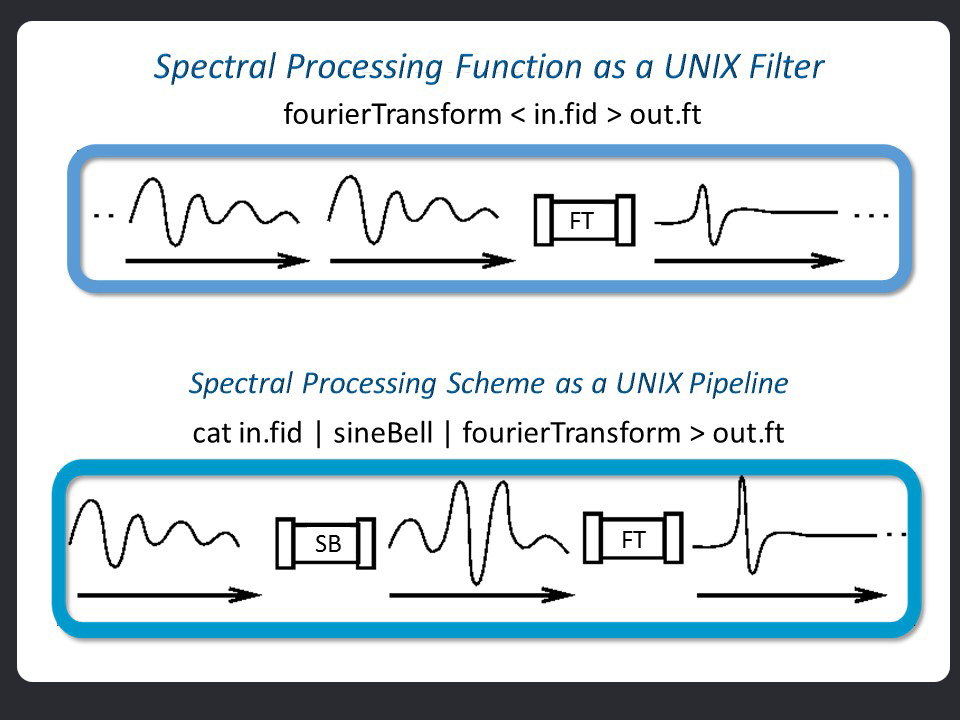
The spectral processing engine of NMRPipe is based on the concept of UNIX filters and pipes. A filter program is one which reads some input, processes it in some way, and produces an output of the result. One example of a filter is the UNIX command sort, which reads lines of text, and writes them sorted in alphabetical order. By analogy, we can implement individual spectral processing functions in this way. For example, a filter program for Fourier Transform would read a series of time-domain vectors as input, and produce a series of frequency-domain vectors as output. A UNIX pipe is used to connect two of more filter programs in series, so that the output of one program is used as the input to the next program in the series. This allows sophisticated schemes to be constructed from a series of simpler steps. The steps can be organized into a text file (a shell script) for easy manipulation and re-use. In the case of a spectral processing scheme, the steps in the pipeline will be functions such as a window function (here, SB, a sine-bell digital filter), zero filling (ZF), Fourier transform (FT), and phase adjustment (PS). Since the programs in a pipeline operate simultaneously, pipeline-based approaches are naturally parallel, and can immediately take advantage of multi-CPU architecture.
#!/bin/csh

var2pipe -in ./hnco.fid -noaswap \
-xN         1024  -yN          128  -zN           64 \
-xT          512  -yT           64  -zT           32 \
-xMODE   Complex  -yMODE   Complex  -zMODE   Complex \
-xSW    8000.000  -ySW    1500.000  -zSW    1650.000 \
-xOBS    499.843  -yOBS    125.707  -zOBS     50.654 \
-xCAR      4.773  -yCAR    175.019  -zCAR    118.019 \
-xLAB         HN  -yLAB         CO  -zLAB          N \
-ndim          3  -aq2D     States                   \
-out fid/test%03d.fid -verb -ov

nmrPipe -in fid/test001.fid \
| nmrPipe  -fn SOL                                    \
| nmrPipe  -fn SP -off 0.5 -end 0.98 -pow 2 -c 0.5    \
| nmrPipe  -fn ZF -auto                               \
| nmrPipe  -fn FT -verb                               \
| nmrPipe  -fn PS -p0 43 -p1 0.0 -di                  \
| nmrPipe  -fn EXT -x1 10.5ppm -xn 5.5ppm -sw         \
| nmrPipe  -fn TP                                     \
| nmrPipe  -fn SP -off 0.5 -end 0.98 -pow 1 -c 1.0    \
| nmrPipe  -fn ZF -auto                               \
| nmrPipe  -fn FT -verb                               \
| nmrPipe  -fn PS -p0 -135 -p1 180 -di                \
| nmrPipe  -fn TP                                     \
| nmrPipe  -fn POLY -auto                             \
-verb -ov -out test.ft2#!/bin/csh
xyz2pipe -in fid/test%03d.fid -x -verb \
| nmrPipe -fn SOL \
| nmrPipe -fn SP -off 0.5 -end 0.98 -pow 2 -c 0.5 \
| nmrPipe -fn ZF \
| nmrPipe -fn FT \
| nmrPipe -fn PS -p0 43 -p1 0.0 -di \
| nmrPipe -fn EXT -x1 10.5ppm -xn 5.5ppm -sw \
| nmrPipe -fn TP \
| nmrPipe -fn SP -off 0.5 -end 0.98 -pow 1 -c 1.0 \
| nmrPipe -fn ZF \
| nmrPipe -fn FT \
| nmrPipe -fn PS -p0 -135 -p1 180 -di \
| nmrPipe -fn TP \
| nmrPipe -fn POLY -auto \
| pipe2xyz -out ft/test%03d.ft2 -x
xyz2pipe -in ft/test%03d.ft2 -z -verb \
| nmrPipe -fn SP -off 0.5 -end 0.98 -pow 1 -c 0.5 \
| nmrPipe -fn ZF \
| nmrPipe -fn FT \
| nmrPipe -fn PS -p0 0.0 -p1 0.0 -di \
| pipe2xyz -out ft/test%03d.ft3 -z
proj3D.tcl -in ft/test%03d.ft3 -abs
peakHN.tcl -proj -in ft/test%03d.ft3 -out hn.proj.tab -hi Full
scroll.tcl -in ft/test%03d.ft3 -tab hn.proj.tab -hi Full
-verb -ov -out test.ft2Citation Information
NMRPipe
NMRPipe: a multidimensional spectral processing system based on UNIX pipes
Frank Delaglio, Stephan Grzesiek, Geerten. W. Vuister, Guang Zhu, John. Pfeifer, and Ad Bax,
J. Biomol. NMR. 6, 277-293 (1995).